

JavaScript Basics: A Beginner-Friendly Guide
JavaScript Basics are the foundation of modern web development. If you want to build interactive websites, dynamic applications, or even full-stack systems, learning JavaScript is essential.
In this beginner-friendly guide, you’ll understand what JavaScript is, how it works, and the core concepts every developer should know.
What is JavaScript?
JavaScript is a high-level, interpreted programming language used to make web pages interactive.
Without JavaScript:
- Websites are static (just HTML & CSS)
With JavaScript:
- You can handle user actions
- Validate forms
- Fetch data from APIs
- Create animations and dynamic UI
In simple terms, JavaScript brings websites to life.
Why Learn JavaScript Basics?
Learning JavaScript Basics opens doors to multiple career paths:
- Frontend Development (React, Next.js)
- Backend Development (Node.js)
- Mobile Apps (React Native)
- Full Stack Development
How JavaScript Works
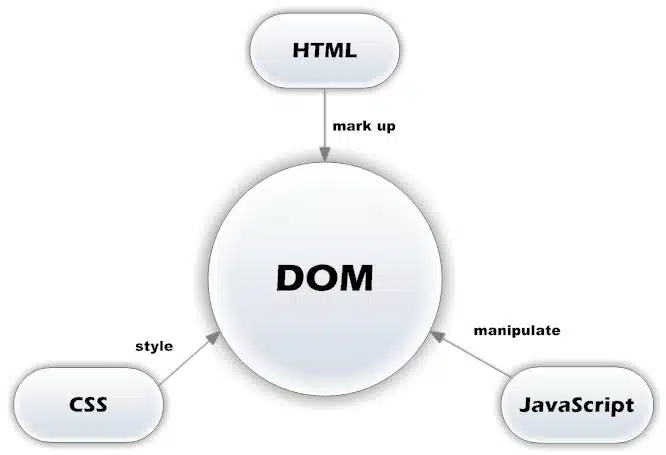
JavaScript runs inside the browser using a JavaScript engine.
Flow:
- HTML loads structure
- CSS styles the page
- JavaScript adds behavior
Example:
- Click a button → JavaScript handles event → UI updates
Variables in JavaScript
Variables are used to store data.
let name = "John";
const age = 25;
var city = "Delhi";
Key Points:
let→ can be updatedconst→ cannot be reassignedvar→ older (avoid in modern code)
Data Types in JavaScript
JavaScript has different types of data:
let name = "John";        // String
let age = 25;            // Number
let isActive = true;     // Boolean
let data = null;         // Null
let value;               // Undefined
Functions in JavaScript
Functions are reusable blocks of code.
function greet(name) {
  return "Hello " + name;
}console.log(greet("Abuzafar"));
Arrow Function:
const greet = (name) => {
  return `Hello ${name}`;
};
Loops in JavaScript
Loops help repeat tasks.
for (let i = 0; i < 5; i++) {
  console.log(i);
}
Other loops:
whileforEach
Conditionals
Used to make decisions.
let age = 18;if (age >= 18) {
  console.log("Adult");
} else {
  console.log("Minor");
}
Arrays
An array is used to store multiple values inside a single variable. Arrays are very useful when you have a collection of related data, such as product names, user names, prices, or numbers.
let fruits = ["apple", "banana", "mango"];

console.log(fruits);Code language: JavaScript (javascript)
Instead of creating separate variables like this:
let fruit1 = "apple";
let fruit2 = "banana";
let fruit3 = "mango";Code language: JavaScript (javascript)
we can keep all the values together in one array.
Accessing Array Elements
Array elements are accessed using their index.
JavaScript array indexes start from 0.
let fruits = ["apple", "banana", "mango"];

console.log(fruits[0]); // apple
console.log(fruits[1]); // banana
console.log(fruits[2]); // mangoCode language: JavaScript (javascript)
So:
fruits[0]→ first elementfruits[1]→ second elementfruits[2]→ third element
This zero-based indexing is important because it appears throughout JavaScript.
Changing an Array Element
You can update an existing value by assigning a new value to its index.
let fruits = ["apple", "banana", "mango"];

fruits[1] = "orange";

console.log(fruits);
// ["apple", "orange", "mango"]Code language: JavaScript (javascript)
Checking the Length of an Array
The length property tells us how many elements are inside an array.
let fruits = ["apple", "banana", "mango"];

console.log(fruits.length); // 3Code language: JavaScript (javascript)
Because indexes start from 0, the index of the last element is usually:
fruits.length - 1Code language: CSS (css)For example:
console.log(fruits[fruits.length - 1]); // mangoCode language: JavaScript (javascript)Adding Elements to an Array
The push() method adds an element to the end of an array.
let fruits = ["apple", "banana"];

fruits.push("mango");

console.log(fruits);
// ["apple", "banana", "mango"]Code language: JavaScript (javascript)
The unshift() method adds an element to the beginning of an array.
fruits.unshift("orange");

console.log(fruits);
// ["orange", "apple", "banana", "mango"]Code language: JavaScript (javascript)
Removing Elements from an Array
The pop() method removes the last element.
let fruits = ["apple", "banana", "mango"];

fruits.pop();

console.log(fruits);
// ["apple", "banana"]Code language: JavaScript (javascript)
The shift() method removes the first element.
fruits.shift();

console.log(fruits);
// ["banana"]Code language: JavaScript (javascript)
Arrays Can Store Different Types of Values
JavaScript arrays can contain strings, numbers, booleans, objects, or even other arrays.
let data = [
  "John",
  30,
  true,
  { city: "Delhi" },
  ["JavaScript", "React"]
];

console.log(data[0]); // John
console.log(data[1]); // 30Code language: JavaScript (javascript)
Although JavaScript allows mixed data types, in real applications arrays usually contain similar kinds of data because they are easier to understand and maintain.
Looping Through an Array
A common task is to process every element in an array.
You can use a for loop:
let fruits = ["apple", "banana", "mango"];

for (let i = 0; i < fruits.length; i++) {
  console.log(fruits[i]);
}Code language: JavaScript (javascript)
You can also use for...of, which is often easier to read:
for (let fruit of fruits) {
  console.log(fruit);
}Code language: JavaScript (javascript)
Output:
apple
banana
mango
Useful Array Methods
JavaScript provides many built-in methods for working with arrays.
For example, includes() checks whether an array contains a value:
let fruits = ["apple", "banana", "mango"];

console.log(fruits.includes("banana")); // true
console.log(fruits.includes("orange")); // falseCode language: JavaScript (javascript)
indexOf() returns the position of an element:
console.log(fruits.indexOf("banana")); // 1Code language: JavaScript (javascript)Later, when working with modern JavaScript applications, you will frequently use methods such as:
map()
filter()
find()
reduce()
For example, map() can create a new array by transforming every element:
let numbers = [1, 2, 3];

let doubledNumbers = numbers.map((number) => {
  return number * 2;
});

console.log(doubledNumbers);
// [2, 4, 6]Code language: JavaScript (javascript)
These array methods are especially important when working with React, Node.js, APIs, and data from databases.
Important Point
Arrays are technically a special type of object in JavaScript.
let fruits = ["apple", "banana"];

console.log(typeof fruits); // objectCode language: JavaScript (javascript)
Because of this, the recommended way to check whether a value is an array is:
console.log(Array.isArray(fruits)); // trueCode language: JavaScript (javascript)Arrays are one of the most commonly used data structures in JavaScript. Once you understand indexing, length, loops, and common array methods, working with larger JavaScript applications becomes much easier.
Objects
An object is used to store related data in key-value pairs. Objects are useful for representing real-world data such as users, products, or orders.
let user = {
  name: "John",
  age: 25,
  isAdmin: false
};

console.log(user.name); // JohnCode language: JavaScript (javascript)
Accessing Object Properties
You can access object values using dot notation:
console.log(user.name); // John
console.log(user.age);  // 25Code language: JavaScript (javascript)
You can also use bracket notation:
console.log(user["name"]); // JohnCode language: JavaScript (javascript)Bracket notation is especially useful when the property name is stored in a variable.
let key = "age";

console.log(user[key]); // 25Code language: JavaScript (javascript)
Adding and Updating Properties
You can easily add a new property:
user.city = "Delhi";Code language: JavaScript (javascript)Or update an existing property:
user.age = 26;Objects Can Contain Arrays and Other Objects
Objects can store different types of values, including arrays and nested objects.
let user = {
  name: "John",
  skills: ["JavaScript", "React"],
  address: {
    city: "Delhi",
    country: "India"
  }
};

console.log(user.skills[0]); // JavaScript
console.log(user.address.city); // DelhiCode language: JavaScript (javascript)
Objects are extremely common in JavaScript, especially when working with APIs, JSON data, React components, and Node.js applications.
DOM Manipulation
JavaScript can interact with HTML.
document.getElementById("btn").addEventListener("click", () => {
  alert("Button clicked!");
});
Fetch API (Basic)
Used to call APIs.
fetch("https://api.example.com/data")
  .then(res => res.json())
  .then(data => console.log(data));
Where JavaScript is Used
JavaScript Basics apply to:
- 🌐 Websites (UI interactions)
- 📊 Dashboards
- 🔗 APIs (Node.js)
- ⚛️ Frameworks like React & Next.js
- 🛒 E-commerce platforms
Real-World Example
When you:
- Click “Add to Cart”
- Submit a form
- Load new data without refresh
👉 That’s JavaScript in action.
Common Mistakes Beginners Make
- Using
varinstead oflet/const - Not understanding scope
- Ignoring async concepts
- Writing long unstructured code
Conclusion
JavaScript Basics are the first step toward becoming a modern web developer. Once you understand variables, functions, and data types, you can move to advanced topics like:
- ES6+
- Async/Await
- APIs
- Frameworks (React, Next.js)
Start small, practice daily, and build real projects.
FAQs
What are JavaScript Basics?
JavaScript Basics include variables, functions, data types, and syntax needed to build web applications.
Is JavaScript easy for beginners?
Yes, JavaScript Basics are beginner-friendly and widely used.
Where is JavaScript used?
JavaScript is used in web development, mobile apps, backend services, and APIs.